Trouble viewing this e-mail? View in Browser
Industrialinfo.com - Website Enhancement
Innovation Based on Your Feedback - Project Report Changes

We are excited to announce the next set of enhancements scheduled for release to industrialinfo.com. Following is a preview of some of the features you can now use.

Please email us with any questions. asksoftwaresupport@industrialinfo.com.


Watch Video Overview of These New Features
New Project Responsibility Field   |   PECWeb Search Screen Changes   |   New Project Report Layout


Introducing Project Responsibility

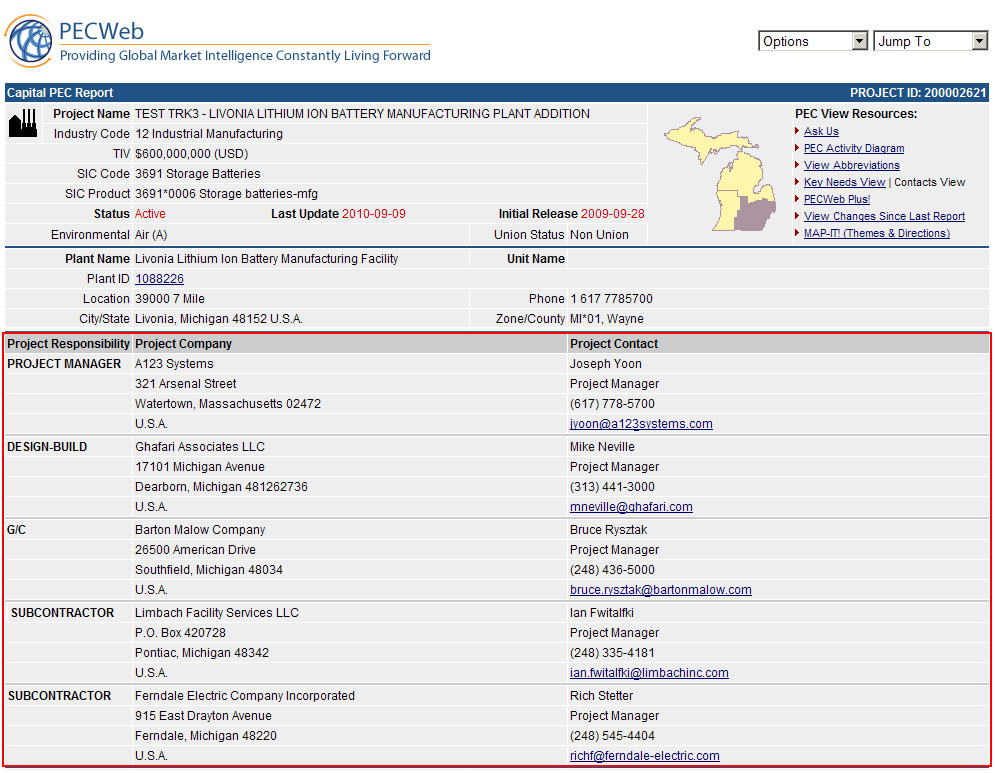
As our growth continues around the world, it has become more apparent that IIR needs to provides a clearer definition of a project contact’s responsibilities. In the past, we have referred to the owner of the plant/project as OWNER, DEVELOPER or SITE REP in the "Contact Type" field. In our new release, we have changed this field name to "Project Responsibility" and introduced several new descriptions that clearly identify the responsibility of each contact.

Not only have we introduced changes in the layout of the Project Report, but we have also introduced new terminology to make it easier for you to identify contacts and their corresponding roles.

The first nine responsibilities will always reside with the plant/project owner, whether it is a contact at a regional office, at the corporate level or at the plant. Roles 10 through 26 will be used only with third-party companies involved with the project. This includes but is not limited to Engineering, Construction, Technology Provider, Equipment Vendor and Financier.

Project Responsibilities can include any of the following:
Example Thumbnail
(Click to View)
 Project ResponsibilityType of Contact
1Project ManagerCorporate or Plant Contact with the Owner
2Project DirectorCorporate or Plant Contact with the Owner
3Project ExecutiveCorporate or Plant Contact with the Owner
4ComplianceCorporate or Plant Contact with the Owner
5Contracts AdministratorCorporate or Plant Contact with the Owner
6Inspection/Validation/Start UpCorporate or Plant Contact with the Owner
7Planning & SchedulingCorporate or Plant Contact with the Owner
8Procurement - PurchasingCorporate or Plant Contact with the Owner
9Specification and ReliabilityCorporate or Plant Contact with the Owner
10Architecture & EngineeringThird-Party Vendor
11ArchitectThird-Party Vendor
12Construction ManagerThird-Party Vendor
13ContractorThird-Party Vendor
14Design EngineeringThird-Party Vendor
15Design-BuildThird-Party Vendor
16Engineering & ConstructionThird-Party Vendor
17EngineeringThird-Party Vendor
18Engineering, Procurement & ConstructionThird-Party Vendor
19EstimatingThird-Party Vendor
20General ContractorThird-Party Vendor
21Real Estate DeveloperThird-Party Vendor
22SubcontractorThird-Party Vendor
23Technology ProviderThird-Party Vendor
24Turn-KeyThird-Party Vendor
25ConsultantThird-Party Vendor
26Project FinancingThird-Party Vendor

To further the Project Responsibility field enhancement, IIR is changing the term Firm Type to Contact Type, and all references to AEC Flag are now called Vendor Flag. The Vender Flag identifies projects that have third-party contract awards. You can view the flag from any PEC results index, and will be able to search for projects that have third-party awards (Covered in the Search Screen Changes below).

Example Thumbnail


PECWeb Search Screen Changes

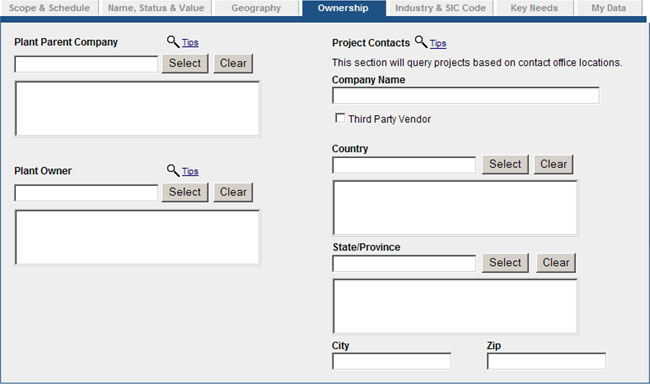
To support the change to the Project Responsibility Field and the Vendor Flag, we have made it easy in PECWeb to search for all contacts or just the third parties involved with projects. To search for projects with third-party vendors, simply check the box labeled "Third Party Vendor" and run the search. Your results will only include projects that have third-party vendors listed. Leaving the boxed unchecked will open the search to all contacts.
Example Thumbnail
(Click to View)


Introducing New Project Report

New Project Report Layout with up to 2 Additional Contacts!
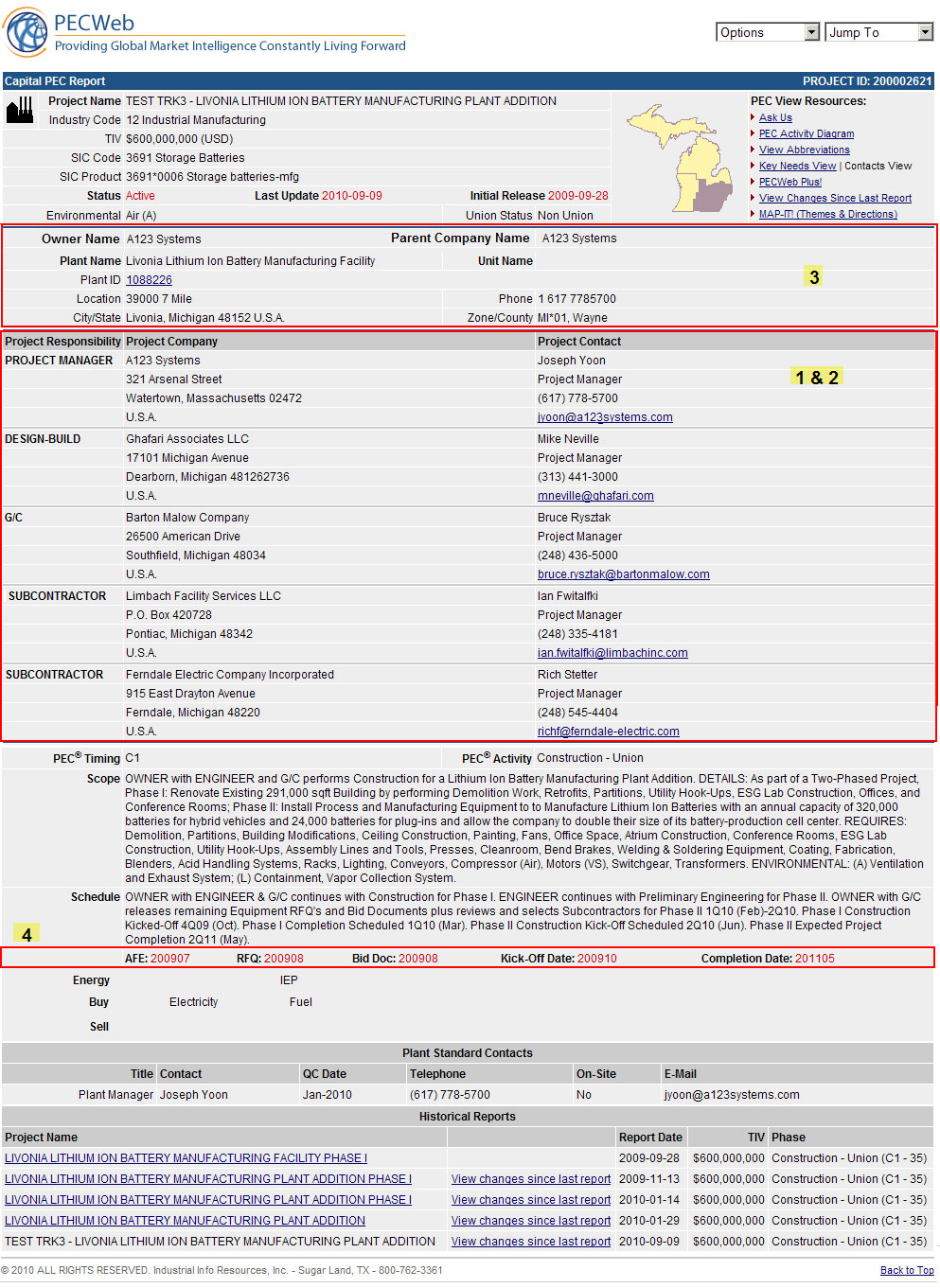
We have just made it easier for you to view the Project Report clearly and accurately, by introducing a newly re-organized report layout. With this new layout IIR is able add more value by including more contacts to the report.

Example Thumbnail
(Click to View)
  1. Project Contacts are now listed horizontally, making it easier to read and to accommodate the new Project Responsibility field.

  2. Up to 5 contacts can now be included in each report! This new layout allows us to add more contacts to each report, making it easier for you to get to the right person.

  3. Plant Details Section – This section of the report has been improved by rearranging the fields and adding the Plant Owner name and Parent Company name.

  4. Important schedule dates are now located just below the Project Schedule section. You can now view key dates and corresponding notes in the same area of the report.
Thank you for your continued support and feedback that allows IIR to make these valuable changes. Should you have any questions regarding this release, contact Member Services by phone at (800) 762-3361 or by email at asksoftwaresupport@industrialinfo.com.


Industrial Info Resources is committed to the overall success of our clients.
We strive to provide our customers with the most up-to-date and dynamic technology available for information management.

All Products | Database Products | Niche Databases | Online Directory | Plant Contact Mailing Lists
Industry Forecasts | Premium Industry News | Map Products | Software
© 2010 ALL RIGHTS RESERVED. Industrial Info Resources, Inc.